
Your photo in, the same moves out
Replace Person in Video With a Photo
Replacing a person in a video means one of three things: a face swap changes only the face, character replacement turns the person into another character, and full-body replacement redraws the whole person (face, hair, build and clothes) while the moves, camera, background and sound stay. This tool does full-body replacement: upload your own clip (MP4 or MOV, 5 seconds to 5 minutes) or pick one of 24 built-in clips, choose a 5, 10, 15 or 30-second part, add up to four portrait photos and get an MP4 that keeps the clip's sound.
Uploads stay private · your clip's sound is kept · failed videos are refunded
Face Swap vs Character Replacement vs Full-Body Replacement
Most "replace person in video" requests are one of these three jobs. Pick the one you need before picking a tool; they are not interchangeable.
| Type | What changes | What stays | What you give it | Typical tools |
|---|---|---|---|---|
| Face swap | The face only | The original body, hair, clothes, moves and background | A video and a face photo | Reface, CapCut face swap, FaceFusion |
| Character replacement | The person becomes a different character: a mascot, an anime look or an invented person | Moves, timing and camera | A video and a character image | Viggle, Higgsfield Recast, Kling Motion Control, Wan 2.2 Animate |
| Full-body replacement | The person's face, hair, build and clothes | Moves, camera, background and sound | A video and a photo of the new person | This page (your clip or 24 built-in clips), Runway, Wan 2.2 Animate in Replace mode |
This page does full-body replacement: your outfit and hair come with you. If you only want your face on the original performer, a face-swap app is quicker.
Specs and Credits
What the tool accepts and what each video costs. The price depends only on the model, the part's length and the resolution.
| Item | Limit |
|---|---|
| Your video | MP4 or MOV, up to 50 MB, 300–4096 pixels per side; never published |
| Video length | 5 seconds to 5 minutes; slide to the part you want |
| Part per video | 5, 10 or 15 s on every model; 30 s on Seedance 2.5 |
| Built-in clips | 24 people clips (one-person and two-person) if you have no video |
| Shape | Kept from the source, snapped to 16:9, 4:3, 1:1, 3:4 or 9:16 and padded, never cropped |
| Sound | The source part's own sound is laid back under the result |
| Photos | Up to four portraits, one person each; JPG, PNG or WebP up to 10 MB |
| Who is replaced | Photo order: Photo 1 the most prominent person, Photo 2 the next; an optional note can cast differently |
| Who can generate | Accounts with any purchase; signup credits alone don't unlock these models |
| Checks | You confirm rights and consent; Seedance 2.5 reviews the photos and the clip first, and a refusal is refunded |
Credits per video, by model, length and resolution
| Model | Length | 480p | 720p | 1080p |
|---|---|---|---|---|
| MiniMax H3 | 5 s | — | 39 credits | 62 credits |
| 10 s | — | 77 credits | 123 credits | |
| 15 s | — | 116 credits | 185 credits | |
| Seedance 2.5 | 5 s | 39 credits | 88 credits | 155 credits |
| 10 s | 78 credits | 175 credits | 310 credits | |
| 15 s | 117 credits | 262 credits | 464 credits | |
| 30 s | 233 credits | 523 credits | 928 credits | |
| Seedance 2.0 | 5 s | 27 credits | 58 credits | 146 credits |
| 10 s | 54 credits | 116 credits | 291 credits | |
| 15 s | 81 credits | 174 credits | 436 credits |
MiniMax H3 (the default) rebuilds the shot from your clip; Seedance 2.5 edits the clip itself and keeps motion closest; Seedance 2.0 is cheaper with looser likeness. Up to four photos cost the same.
How to Replace a Person in a Video With a Photo on Your Phone
No app and no editing: it all runs in a phone browser, and the video renders on the server while you wait or leave.
Step 1: Upload your video or pick a clip
Upload an MP4 or MOV (up to 50 MB, 5 seconds to 5 minutes) and slide to the 5, 10, 15 or 30-second part you want, or pick one of the 24 built-in clips.
Step 2: Add up to four portraits
One person per photo, face clear. Photo 1 replaces the most prominent person and Photo 2 the next; on a two-person built-in clip Photo 1 takes the person on the left at the start.
Step 3: Choose model, length and resolution
MiniMax H3 (default) rebuilds the shot from your clip, up to 15 s at 720p or 1080p; Seedance 2.5 edits your clip directly, up to 30 s; Seedance 2.0 is cheaper, up to 15 s. The credits show on the button before you start.
Step 4: Generate and download
Most videos take a few minutes and the task is saved if you leave. The MP4 keeps your clip's sound, ready for TikTok, Reels or Shorts.
Photo checklist
- One person per photo: crop out friends, pets and posters with faces
- Face clearly visible and turned toward the camera
- Even light and no beauty filter
- No sunglasses, mask or hair across the eyes
- Upper body or full body if you want your clothes kept
Replace Two People at Once: Friends and Couples
Photo order is the casting: Photo 1 replaces the most prominent person, Photo 2 the next, up to four photos. On the built-in two-person clips, Photo 1 takes the person on the left at the start and Photo 2 the other one.
To cast differently, say it in the optional note, for example "Photo 1 replaces the woman on the right". Anyone without a photo stays as filmed.
With one photo on a two-person clip, only the first person changes. For a group, upload a clip of your friends and add up to four photos, or make videos in pairs and cut them together.
Replace Person in Video: Examples
These were made with other tools and by other creators, not on this site. They show what a whole-person replacement looks like; each one links to its source.
Before and after: one photo replaces the dancer
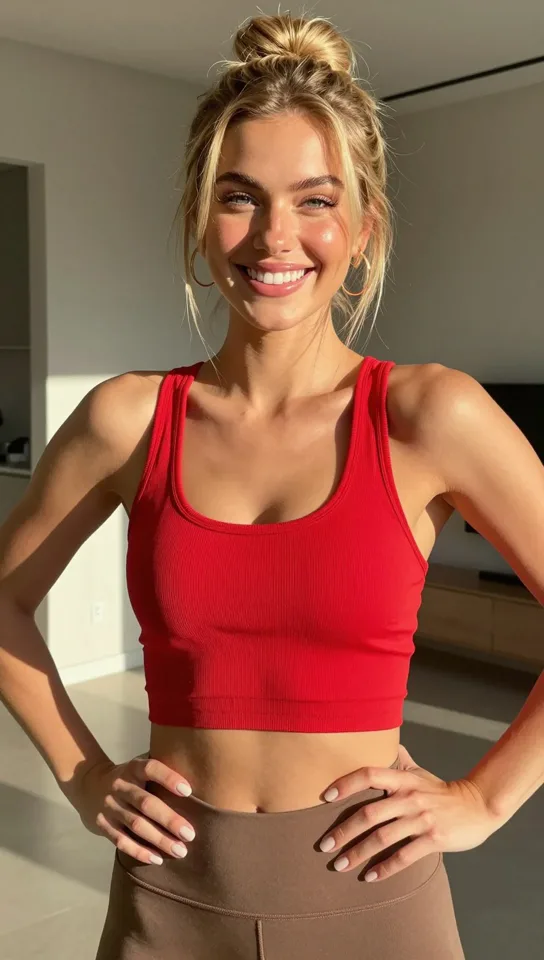
The same idea on trend clips
Made with other generators and shown with credit; not licensed. Ask us and we'll take one down.
More Viral Clips, Each With Its Own Generator
These trends have their own pages on this site, with the song included and fixed roles for each photo. Prices are live and show each page's cheapest video.
| Clip | Who each photo becomes | Lengths | Frame | From |
|---|---|---|---|---|
| Toc Toc AI danceLiving-room solo to Patrick Sébastien's "Toc Toc" | Your photo becomes the solo dancer. | 10 s | 9:16 | 9 credits |
| Hotel Lobby (Quavo & Takeoff)The COLORS booth performance | Photo 1 stands left of the mic, Photo 2 right of the mic. | 5/10/15 s | 16:9 | 5 credits |
| APT. (ROSÉ & Bruno Mars)The pink-studio duet | Photo 1 plays the drums, Photo 2 sings with the mic. | 5/10/15 s | 16:9 | 5 credits |
| Bulin 47 freestyleStreet freestyle at a red-lit door | Your photo replaces the rapper; the man holding the speaker stays. | 5/10/15/19 s | 9:16 | 5 credits |
| Burning Bridges (Drake)Chandelier party with the "Where she at?" eye covers | Your photo becomes the life of the party, cup in hand. | 10/15/20 s | 9:16 / 16:9 | 11 credits |
| Rumpelstiltskin tiptoe memeAI-made hay-barn dance | Photo 1 tiptoe-dances, Photo 2 watches from the hay; the same photo twice makes a solo. | 12 s | 16:9 | 93 credits |
| Smalltown Boy danceTwo scream close-ups, then the dance | Photo 1 screams first and dances left, Photo 2 screams second and dances right. | 5/10/15/24 s | 9:16 | 10 credits |
| Raindance (Dave & Tems)Pier-and-beach scene | Photo 1 waits on the pier and later films, Photo 2 walks in and sings. | 5/10/15/30 s | 4:3 | 5 credits |
| Alors on DanseWhite-studio keyboard meme | Photo 1 plays the mini keyboard, Photo 2 is the hype partner. | 5/10/15/30 s | 9:16 / 16:9 | 6 credits |
Where the "Put Yourself in a Viral Video" Trend Came From
Swapping yourself into famous footage went mainstream in September 2019, when the Chinese app Zao put users' faces into film and TV scenes from a single selfie, along with an early privacy backlash.
By 2026 the joke had moved from faces to whole people. Short clips such as Quavo and Takeoff's "Hotel Lobby" performance on A COLORS SHOW get recast with friends, partners and pets, and each clip becomes its own short-lived TikTok trend.
That is why this page is built around clips: the clip carries the joke, and the photo decides who is in it.
Sources
Is It Free? Watermark, Price and Pay-As-You-Go
Short answer: choosing a clip, uploading and seeing the price are free; generating needs an account with a purchase, and each video costs credits shown on the button before you start. No subscription is needed.
| Item | What you get |
|---|---|
| Clips, uploads and the price | Free, no credits used |
| Who can generate | Any account with a purchase: a one-time pack, a plan or the $5 trial. Signup credits alone don't unlock it. |
| Cheapest video | 27 credits: Seedance 2.0, 5 s, 480p |
| Without a subscription | One-time packs from $17 for 300 credits; pack credits don't expire |
| Watermark | None: only paying accounts generate here, so every download is clean |
| Failed or refused video | Credits come back automatically |
Longer parts and higher resolutions cost more; the exact price for every model, length and resolution is in the specs table above.
Compare plans and credit packsOther Ways to Replace a Person in a Video
This tool takes your own clip (up to 30 s per video) or one of its built-in clips. These are the other routes and who they fit (checked October 12, 2026).
| Route | Examples | What you give it | What it replaces | Cost and catch |
|---|---|---|---|---|
| Face-swap phone apps | Reface, CapCut face swap | A template or your own video, plus a selfie | The face only | Free tiers exist, often with watermarks or short limits |
| Upload-your-video web tools | Viggle, Higgsfield Recast, Kling Motion Control, Runway | Your video plus one image of the new person | The whole person or a character | Paid credits; length, resolution and watermark depend on the plan |
| Open source on your own PC | Wan 2.2 Animate (Replace mode) in ComfyUI | Your video plus one image, run locally | The whole person, relit to match the scene | Free and no watermark; needs an NVIDIA graphics card, model downloads and setup time |
| Pay per run in the cloud | wan-2.2-animate-replace on Replicate | A video and an image, sent through an API | The whole person | Pay per run with no subscription; meant for developers |
| This page | Your own clip, or 24 built-in clips | A video (or a built-in clip) and up to four photos | The whole person; moves, camera and sound stay | Credits per video after any purchase; 5–30 s per video, in a phone browser |
Wan2.2-Animate is open source under Apache 2.0, and ComfyUI ships a ready-made automatic character replacement workflow for it. On a mid-range graphics card, expect short, low-resolution clips and long render times.
When the Face Drifts or Hands Look Wrong
Most bad results come from the photo or the model choice. What to change, one line each:
| Problem | Likely cause | What to change |
|---|---|---|
| The face changes from shot to shot | A small, soft or side-on face in the photo | Use a sharp, front-facing photo where the face is large; try Seedance 2.5 |
| It still looks like the original performer | The photo shows too little of the face or body | Use a waist-up photo with the face fully visible |
| Two faces blend into each other | A group photo, or two very similar photos | One person per photo; if the roles came out reversed, press Swap and try again |
| Hands, teeth or eyes look odd | Fast moves rendered at a low resolution | Choose 720p or 1080p; a shorter length also has fewer fast moves |
| The result looks blurry | A 480p render | Treat 480p as a cheap draft and render the keeper at 720p or 1080p |
| Lips don't match the song | The clip copies the original performance; nothing is lip-synced to new audio | Expected: the mouth follows the original performer's timing |
A failed or refused video gives its credits back automatically, so a retry with a better photo costs nothing extra.
Consent, Celebrities and Posting
Use videos and photos you have the rights to, and only people who are adults and agreed to it; you confirm this before every upload-based video. Don't upload public figures or anyone you want to embarrass. Seedance 2.5 checks the photos and your clip before rendering, and a refused job is refunded.
The clips use songs and performances that belong to others. TikTok and Instagram let you post with music from their own sound libraries, but ads and monetised channels need a licence, and TikTok asks for realistic AI videos to be labelled.
Your videos and photos are stored under random, unlisted file names, are only used to make your video and never appear in a public gallery.
Plans and credit packs
One-time packs don't expire; monthly plans cost less per credit if you make videos every week.
Starter
For trying the trend
240 credits / month
≈ 10 ten-second Seedance 2.0 Mini videos
- Watermark-free videos, including ones you already made
- Every model, length and resolution
- Failed videos refunded
- Email support
Pro
PopularFor regular creators
780 credits / month
≈ 32 ten-second Seedance 2.0 Mini videos
- Watermark-free videos, including ones you already made
- Every model, length and resolution
- Failed videos refunded
- Priority support
Enterprise
For agencies and pages
2,650 credits / month
≈ 110 ten-second Seedance 2.0 Mini videos
- Everything in Pro
- Dedicated support
Replace Person in Video: FAQ
Can I replace a person in a video from my phone, with no computer and no paid app?
Yes. Open this page in Safari or Chrome on your phone, upload a clip from your camera roll (or pick a built-in clip), add a selfie and generate; the video renders on the server and downloads as an MP4. Generating needs an account with any purchase, starting with the one-time packs.
Can I make TikTok or Reels replacement videos for free without a watermark?
Not here: generating needs an account with a purchase, and the cheapest video is 27 credits (Seedance 2.0, 5 s, 480p). Paid videos carry no watermark. The one route that is both free and watermark-free is running open-source Wan 2.2 Animate on your own graphics card.
Where did the trend of putting yourself into viral videos come from?
Face-swap clips went mainstream with the Chinese app Zao in 2019. Since 2026 the trend has been whole-person recasts of specific clips, such as the Hotel Lobby COLORS performance, the APT. duet and the Toc Toc dance, each spreading on TikTok with friends, couples and pets swapped in.
My friends all want to be in the same clip. How many people can be replaced?
Up to four per video: add one portrait per person, and Photo 1 replaces the most prominent person, Photo 2 the next. Use the optional note to say who replaces whom. Anyone without a photo stays as filmed.
Is there a pay-as-you-go option instead of a subscription?
Yes. One-time credit packs start at $17 for 300 credits and don't expire; any purchase unlocks the tool. The cheapest video is 27 credits (Seedance 2.0, 5 s, 480p). Monthly plans cost less per credit if you make videos every week.
Can I replace a person in a video with CapCut alone?
CapCut's face swap changes the face and keeps the original person's body, hair and clothes. To replace the whole person, make the video with a full-body tool first, then use CapCut for captions, cuts and music.
Can I replace a person in a video for free on my own PC?
Yes, with open-source Wan 2.2 Animate in Replace mode, run through ComfyUI's character replacement workflow. It's free, adds no watermark and takes your own video, but it needs an NVIDIA graphics card, large model downloads and time to set up; mid-range cards manage short, low-resolution clips.
Can I post a version with a celebrity on TikTok?
Better not. Using a real person's likeness without consent can break platform rules and personality-rights laws even as a joke, and TikTok asks for realistic AI videos to be labelled. Use yourself or friends who agreed.
Ready to Step Into a Viral Video?
Upload your clip or pick a built-in clip, add your photos and get the MP4 in a few minutes. Trends with their own page:
Start replacing