
How it works · two photos · the original kitchen take
What You Want Me To Do AI Video: How the Fredo Bang “Oouuh” Duet Is Made
A “What You Want Me To Do” AI video puts two people, or pets, into Fredo Bang's 2018 “Oouuh” kitchen duet: one strums a ukulele, one sings the hook. Upload two photos here. They become one first frame, a depth map of the original take moves them, and the original sound goes back on. Further down: each step, why some versions look fake, and what each choice costs.
Make your duet- Two photos, or one twice
- 10, 15 or 23 seconds
- The take's original sound
- From 19 credits
23 seconds · 9:16 · 480p · original sound
Your photos first become one still, then the video follows the 2018 take. Seedance 2.5 checks the still, photos, room and reference before rendering; if the check fails, the credits come back. Usually a few minutes.
The depth map your photos follow: two silhouettes, no faces. Play it with sound; the original audio comes with your video.
What is a “What You Want Me To Do” AI video?
It is a remake of Fredo Bang's “Oouuh” kitchen duet with two new faces: one person strums a ukulele on the left, the other sings the hook on the right. The name is a line from the hook, “what you want me to do”, not the song's title. That is why searching the phrase often turns up generic AI video tools instead of the trend.
- The phrase
- A line in the hook of “Oouuh”. People search the line they hear, not the title.
- The song
- “Oouuh” by the rapper Fredo Bang
- The original clip
- A 2018 phone video in a narrow kitchen: Einer Bankz plays the ukulele on the left, Fredo Bang sings on the right. Einer Bankz reposted it on TikTok in April 2022.
- The AI version
- Two photos replace both performers in the same kitchen, with the same moves and the original sound. It took off on TikTok in early October 2026.
- Also called
- Fredo Bang AI video, Oouuh AI, the ukulele duet trend, the kitchen duet
- Not to be confused with
- “Baby What You Want Me to Do” (Jimmy Reed) and “Tell Me What You Want Me to Do” (Tevin Campbell): same words, different songs, no connection to the trend
Facts checked October 23, 2026. Sources: the 2018 take as posted on TikTok · “Oouuh” audio on YouTube
What happens between your two photos and the finished clip
Four steps run between your upload and the MP4. Each one decides part of the result, and each one is where a particular kind of fake-looking video starts.
- Step 1
Your two photos
Photo 1 becomes the ukulele player on the viewer's left, Photo 2 the singer on the right. They are the only source of faces, hair or fur, skin, build and clothes.
- Step 2
One duo still
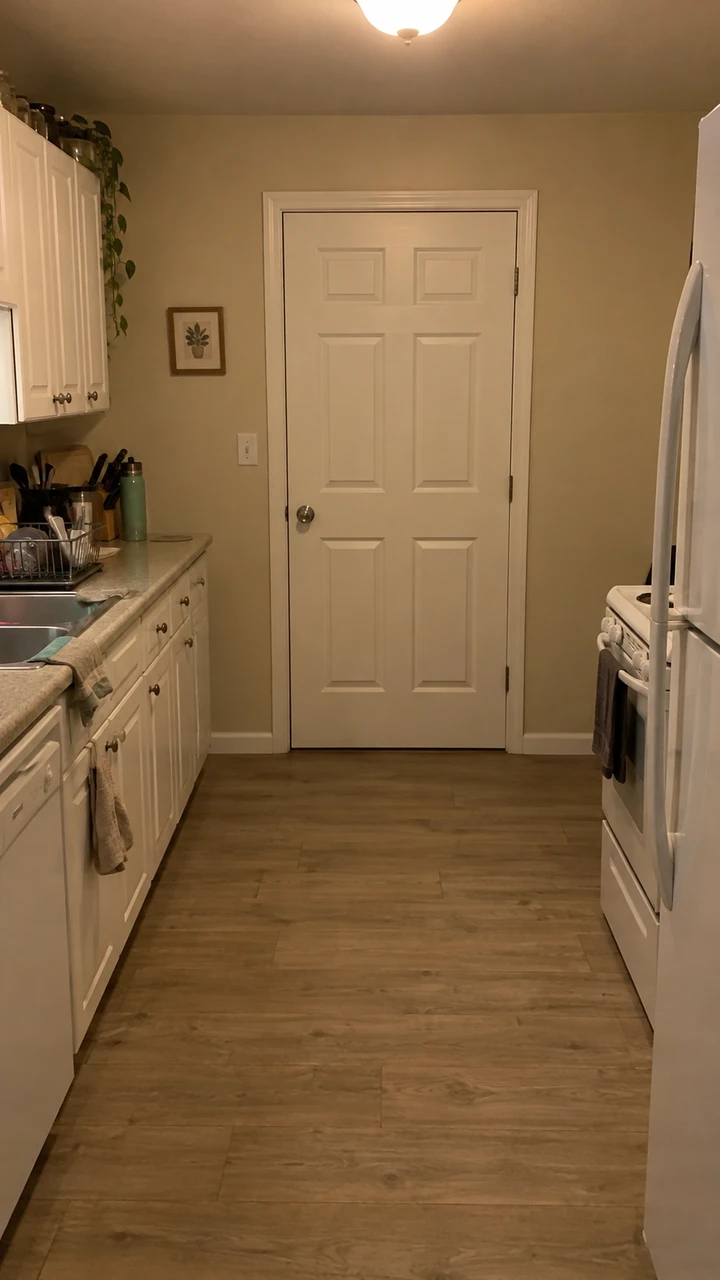
An image model places both subjects in the empty kitchen, or your room, as the first frame: the player holding the ukulele, the singer with a hand at the chin.
- Step 3
The motion reference
A depth map of the first 23 seconds of the 2018 take: two grey silhouettes on black. It carries positions, every move, the timing and the handheld camera, and nothing about how anyone looks.
- Step 4
The original sound goes back on
The video model renders without sound; the take's own audio is laid underneath from the same reference, so the “ooh” lands where the singer's head goes back.
What each step decides, and where it goes wrong
| Step | Input | What it decides | What goes wrong here |
|---|---|---|---|
| Your two photos | Two portraits, or one photo twice | Who plays which side; how every face and outfit looks | Small, blurry or group photos: faces drift, people blend or swap sides |
| One duo still | Photo 1, Photo 2 and the kitchen plate or your room | Framing, the ukulele, the room and the light | A cluttered or tilted room photo; a face rebuilt from too few pixels |
| The motion reference | The depth video, plus the still and both photos | Every move, every beat and the camera sway | Without a reference (prompt-only tools) moves and timing drift; fingers are not in the outline and have to be invented |
| The original sound goes back on | The reference clip's audio | Sync between the voice and the moves | Tools that make new audio lose the song; trimming the start in an editor pushes the sound out of sync |
The 23-second take, beat by beat
The reference is one continuous phone shot with no cuts. Shorter videos are the same take stopped early, so the length you pick decides whether the hook is in it.
| Time | Singer (right) | Ukulele player (left) | In which length |
|---|---|---|---|
| 0–4 s | Hand at the chin, then on the chest; sways and sings the first lines to the camera | Strums with the head down, glances up once | 10, 15 and 23 s |
| 4–7 s | Breaks into a grin and laughs; the head tips back at about 7 s | Looks up at the camera, smiling | 10, 15 and 23 s |
| 7–10 s | Fist beside the head, then sings straight to the camera | Glances up, then back to the strings | 10, 15 and 23 s (10 s ends here) |
| 10–14 s | Arms swing low, bobbing to the beat; a breath before the hook, one hand at the hip | Keeps strumming | 15 and 23 s |
| 14–17.5 s | The hook: head back, eyes closed, a long held “ooh” | Strums steadily | 23 s (15 s stops one second in) |
| 17.5–23 s | Reaches toward the camera, fist up, pushes both hands out, final held note | Looks up smiling, then back down | 23 s only (Seedance 2.5) |
Mouth timing comes from this timeline, not from the audio: the model is told when the singer sings, holds a note or laughs, and the original sound is added afterwards. That is why the long held note at 14–17.5 s is where lip sync is easiest to judge.
Why some look real and others look fake
The same few giveaways show up again and again in these videos. Each one starts at a specific step, so it can be traced and avoided.
| What you see | Why it happens | Step | What to change |
|---|---|---|---|
| The face stops looking like the photo | The face is rebuilt twice, in the still and then in every frame, from too few pixels: a small, soft or turned face | Still and video | A sharp, front-facing photo with the face large in frame; 720p or higher when the face matters most |
| The mouth is out of time with the “ooh” | Lip movement follows the timed moves, not the audio; the sound is added afterwards | Motion and sound | Don't trim the start when editing; the 14–17.5 s held note is the hardest part, and 10 s leaves it out |
| The ukulele player sings along | Two faces next to a singing voice, or a singing photo in the player's slot | Video | Put the quieter person in Photo 1, ideally with a closed-mouth expression |
| Fingers melt into the strings | Fingers are too small for the depth outline, so the model has to invent them | Video | Photos with the hands visible; 720p or 1080p gives fingers more pixels |
| The two swap sides or blend into each other | Group photos, or two photos with no clear single subject | Still | One person or pet per photo; use Swap sides if the wrong one is on the left |
| Soft, smeared video on TikTok | 480p stretched to a phone screen, or a low-resolution photo saved from a chat | Render | 720p or 1080p for posting; upload the original photo, not a screenshot |
| The room bends or flickers | A custom room photo that is tilted, cluttered or has people in it | Still | Keep the kitchen, or photograph an empty room straight on, vertically, at chest height |
| A pet gets human hands | Strumming hands are what the model expects to see | Video | A full-body pet photo with the paws visible |
Four checks before you post
- Pause at 4 s and at 15 s: both faces still match the photos.
- The ukulele player's mouth stays closed the whole time.
- One hand stays on the ukulele's neck and the other on the strings.
- At 14 s the singer's head goes back just as the long “ooh” starts.
Four ways people make this video, and what each one keeps
The clips in your feed come from four different methods. They differ less in polish than in what they keep from the original: the moves, the sound, and whose faces and bodies you see.
| Method | Moves and timing | Sound | Whose face and body | Pets | What you do |
|---|---|---|---|---|---|
| Template driven by a depth map of the take (this generator) | Follows the original take beat for beat | The take's own audio laid back on | Both faces and bodies come from your two photos | Yes, standing upright with paws | Upload two photos, pick a length |
| CapCut or PixVerse template (the TikTok tutorials) | Whatever the template's maker built; close to the trend | The trend sound inside the app | Your photos, framed the way the template was built | Depends on the template | Find the template by name or a tag such as #pioneertemplate, then add photos in the app |
| Prompt-only video model (Kling, Runway, Veo and similar) | Described in words, so moves and timing drift | Nothing from the original; add music in an editor | Usually one image reference; two specific people are hard | Possible | Write a prompt, re-roll several times, fix the audio |
| Face swap onto the original clip | Exact: it is the original footage | The original | Only the faces change; bodies, clothes and the kitchen stay the original performers' | No | Pick the clip, upload faces; it reuses real people's footage |
A depth map stands in for the original video because it carries only shapes and movement. Nothing about how Fredo Bang or Einer Bankz look reaches the model, so every face, every outfit and the room come from what you upload.
Which model changes what
All five models follow the same reference and start from the same still. What differs is length, output size, the review step and price.
| Model | Lengths | Output | From | What's different |
|---|---|---|---|---|
| Seedance 2.0 Mini | 10 s / 15 s | 480p / 720p | Costs 19 credits | The cheapest. The $5 trial's 24 credits pay for 10 s at 480p. |
| Seedance 2.0 Fast | 10 s / 15 s | 480p / 720p | Costs 36 credits | Same lengths and output sizes as Mini, at a higher price. |
| Seedance 2.0 | 10 s / 15 s | 480p / 720p / 1080p | Costs 58 credits | The cheapest way to 1080p at 10 or 15 s. |
| Seedance 2.5 | 10 s / 15 s / 23 s | 480p / 720p / 1080p | Costs 82 credits | The default and the only model for the full 23 s. It reviews the still, photos, room and reference first; a failed review refunds. |
| MiniMax H3 | 10 s / 15 s | 720p | Costs 81 credits | 720p only, 10 or 15 s; a different model family from Seedance. |
Three remakes of the same take
Same kitchen, same moves, same sound. Each one follows the 2018 take beat for beat with its original audio.
Credits per video
Every price is one finished video, the duo still included. Seedance 2.5 is the only model with the 23-second length.
| Model · length | 480p | 720p | 1080p |
|---|---|---|---|
| Seedance 2.0 Mini · 10 s | Costs 19 credits | Costs 36 credits | — |
| Seedance 2.0 Mini · 15 s | Costs 27 credits | Costs 52 credits | — |
| Seedance 2.0 Fast · 10 s | Costs 36 credits | Costs 73 credits | — |
| Seedance 2.0 Fast · 15 s | Costs 52 credits | Costs 108 credits | — |
| Seedance 2.0 · 10 s | Costs 58 credits | Costs 120 credits | Costs 295 credits |
| Seedance 2.0 · 15 s | Costs 85 credits | Costs 178 credits | Costs 440 credits |
| Seedance 2.5 · 10 s | Costs 82 credits | Costs 179 credits | Costs 314 credits |
| Seedance 2.5 · 15 s | Costs 121 credits | Costs 266 credits | Costs 468 credits |
| Seedance 2.5 · 23 s | Costs 183 credits | Costs 405 credits | Costs 716 credits |
| MiniMax H3 · 10 s | — | Costs 81 credits | — |
| MiniMax H3 · 15 s | — | Costs 120 credits | — |
From 19 credits (about $0.71) to 716 credits (about $26.62), at the cheapest monthly plan's credit price. The default, Seedance 2.5 for the full 23 s at 480p, is 183 credits (about $6.80).
Free use, trial and watermark
| Question | Answer |
|---|---|
| Uploading photos and trying settings | Free, no credits used |
| Signup credits | 3 free credits for new accounts; the cheapest video here is 19, so they don't pay for one on their own |
| The $5 trial (once per account) | Covers one: its 24 credits pay for a 10-second 480p Seedance 2.0 Mini video (19 credits) |
| Is a subscription required? | No; one-time credit packs work too |
| Watermark | Videos made before your first purchase carry a small moving watermark; any purchase unlocks the clean original, including videos you already made. |
| Failed videos | Credits come back automatically, including a failed review on Seedance 2.5 |
Your photos: where they go and whose to use
The template needs two clear faces, so it matters what you upload and what happens to it.
- Private storage. Photos are stored privately under your account and sent to the video model only to make your video. Results appear only in your own history.
- Model review. On Seedance 2.5 the still, both photos, the room and the motion reference pass the model provider's content review before rendering; if it fails, the credits come back.
- Ask first. Get the OK of everyone pictured before you upload, and show them the result before you post.
- No public figures or children. Celebrities, politicians, strangers and children are not allowed here.
- Label it. TikTok, Instagram and YouTube ask creators to mark realistic AI video; switch on the AI-generated label when you post.
Make yours in four steps
Same pipeline as above, from your side of the screen.
- 01
Choose two photos
Photo 1 is the ukulele player on the left, Photo 2 the singer on the right. One person or pet per photo with a sharp face; full body helps the clothes. The same photo twice plays both parts.
- 02
Keep the kitchen or add a room
The empty kitchen is sent by default because the motion reference has no room in it. To use your own place, upload a vertical photo of an empty room taken straight on at chest height.
- 03
Pick a length and model
10 s ends before the hook, 15 s reaches the first held “ooh”, 23 s has the hook twice (Seedance 2.5 only). 480p is enough to check the faces; 720p or 1080p is better for posting.
- 04
Generate and download
The still is made first, then the video; a run usually takes a few minutes. Download the MP4 with the original sound and post it as 9:16.
Photo checklist
- One person or pet per photo, no group shots.
- A sharp face toward the camera, not a screenshot or a photo forwarded through a chat app.
- Waist-up or full-body photos help the clothes look right below the frame edge.
- Hands or paws in view if you can: the player's strumming hand is the hardest part.
- For your own room: empty, vertical, straight on, no people or pets in it.
Plans and credit packs
Every model, length and resolution of the What You Want Me To Do template is paid in credits; one-time packs and monthly plans both work.
Starter
For trying the trend
240 credits / month
≈ 10 ten-second Seedance 2.0 Mini videos
- Watermark-free videos, including ones you already made
- Every model, length and resolution
- Failed videos refunded
- Email support
Pro
PopularFor regular creators
780 credits / month
≈ 32 ten-second Seedance 2.0 Mini videos
- Watermark-free videos, including ones you already made
- Every model, length and resolution
- Failed videos refunded
- Priority support
Enterprise
For agencies and pages
2,650 credits / month
≈ 110 ten-second Seedance 2.0 Mini videos
- Everything in Pro
- Dedicated support
What You Want Me To Do AI video: how-it-works FAQ
What AI model makes the What You Want Me To Do videos?
Here: ByteDance's Seedance 2.0 Mini, Fast, 2.0 and 2.5, and MiniMax H3; most one-click Oouuh sites also run on Seedance. Seedance 2.5 is the default and the only one that makes the full 23 seconds. From 19 credits (about $0.71) to 716 credits (about $26.62), at the cheapest monthly plan's credit price. The default, Seedance 2.5 for the full 23 s at 480p, is 183 credits (about $6.80). Videos made before your first purchase carry a small moving watermark; any purchase unlocks the clean original, including videos you already made.
Is a What You Want Me To Do AI video just a face swap?
Not here. A face swap pastes your face onto the original footage, so the bodies, clothes and kitchen stay the original performers'. This generator rebuilds the whole frame: your two photos become a new first frame and a depth map of the 2018 take moves them, so faces, bodies, clothes and, if you upload one, the room all come from your images.
Why doesn't the face in my video look like my photo?
Usually because of the photo. The face is rebuilt twice, once in the still and again in every frame of the video, and a small, soft or angled face loses detail each time. Use a sharp, front-facing photo of one person with the face large in frame, no sunglasses or heavy filter, and pick 720p if the face matters most.
Why do some What You Want Me To Do AI videos look real and others look fake?
The giveaways are faces that drift, a ukulele player who sings along, fingers that melt into the strings and soft, smeared video. Most come from the inputs (small faces, group photos, screenshots) or from a method that doesn't follow the original take, such as a prompt-only video model. Clips made from the original motion with sharp single-person photos are the ones that pass as real.
Is the sound the real “Oouuh” recording or AI audio?
Here it is the real one: the video model renders without sound and the 2018 take's own audio is laid underneath, in sync with the depth map. Some other generators make new ukulele music instead. The song belongs to its rights holders; on TikTok and Reels you can also mute it and add the “Oouuh” sound from the app's library.
Can one person or one pet play both parts?
Yes. Upload the same photo in both slots and two copies play the player and the singer, like the golden retriever example above. A pet works too: it stands upright and strums with its paws.
Can I use a celebrity's photo for this trend?
No. Use photos of yourself and people who agreed: friends, partners, family, your own pets. Public figures, strangers and children are not allowed here, and platforms remove realistic AI videos of real people made without their consent.
Two photos, one kitchen, the original sound
Pick who strums and who sings; the reference handles the moves and timing. From 19 credits.
Make your duetMore two-person templates